MCP connector
Connect Claude, ChatGPT or another MCP client: endpoints, sign-in, every tool, and the approve-before-publish flow.
ReBrandOS is a remote MCP server. Connect it to an AI client and the client can read your brand, save drafts it wrote, render carousels and short videos from your own media, and schedule posts — but only after you approve the exact plan. ReBrandOS does not write copy or generate images for you: your AI client writes, and ReBrandOS checks, stores, renders and publishes.
Endpoints
| URL | Use it for |
|---|---|
https://ops.rebrandos.com/mcp | The connector. Sign in with OAuth 2.1 in your browser. Recommended. |
https://ops.rebrandos.com/mcp/key | The same tools, authenticated with a fixed key in an Authorization: Bearer header, for when OAuth sign-in won’t complete. See Fixed-key option. |
https://ops.rebrandos.com/.well-known/oauth-protected-resource | OAuth protected-resource metadata. Clients find it on their own. |
https://ops.rebrandos.com/.well-known/oauth-authorization-server | OAuth authorization-server metadata: authorization code with PKCE (S256), dynamic client registration, refresh tokens. |
The server speaks MCP over Streamable HTTP and answers with JSON. There is no separate SSE endpoint.
Connect Claude
- In Claude, add a custom connector (Claude calls them connectors; which Claude plans can add custom ones is up to Anthropic).
- Paste
https://ops.rebrandos.com/mcpas the URL and save. - Choose Connect. ReBrandOS opens in your browser; sign in if asked.
- The consent page says Connect Claude to your brand workspace and lists the permissions Claude asked for. Under Brand access, keep All current and future brands or pick Choose specific brands and tick the ones Claude may use.
- Choose Accept. Back in Claude, ask it to list its ReBrandOS tools. If it can, you’re connected.
insufficient_scope and names the role.Connect ChatGPT
ChatGPT connects to ReBrandOS as a custom MCP server with OAuth sign-in. Custom servers are only available where OpenAI enables them for your plan and workspace; if you don’t see the option below, check OpenAI’s help center for your plan.
https://chatgpt.com/oauth/client.json) and also supports dynamic client registration.- In ChatGPT, open Customize → Plugins, then choose Add → Add custom MCP server.
- Name it ReBrandOS. Under Connection keep Server URL and enter
https://ops.rebrandos.com/mcp. Leave Authentication on OAuth; the advanced OAuth settings are discovered automatically.
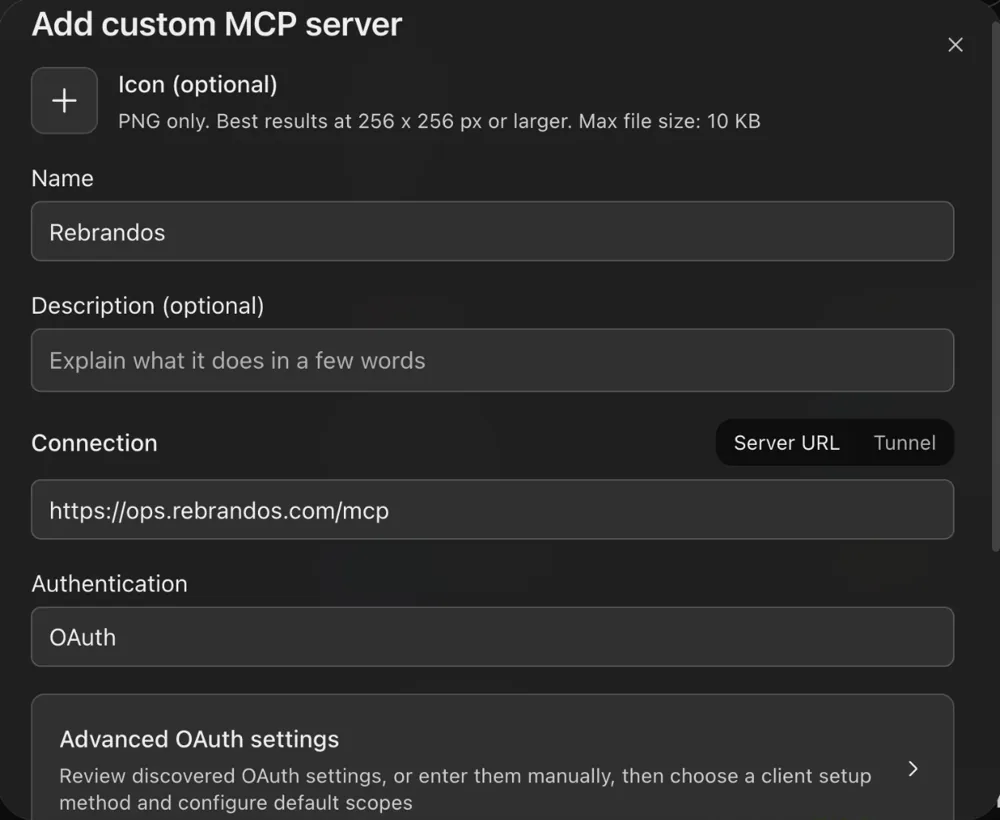
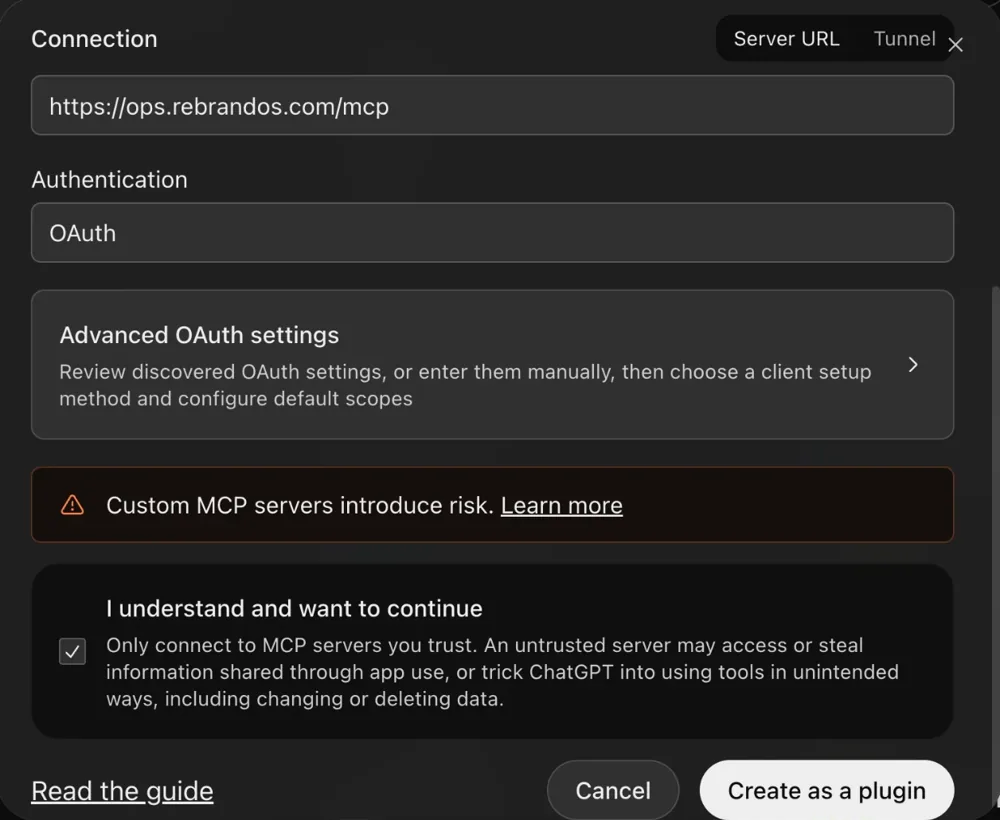
- Read ChatGPT’s warning about custom servers, tick I understand and want to continue, then choose Create as a plugin.
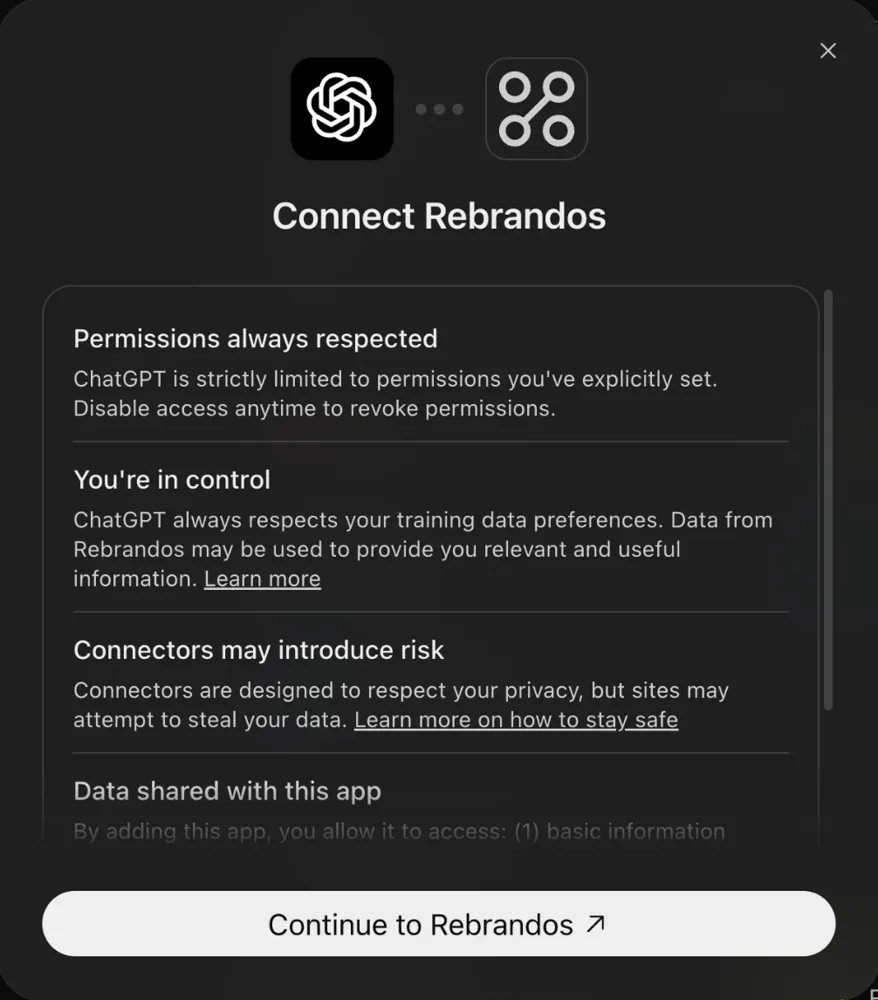
- ChatGPT asks you to connect. Choose Continue to ReBrandOS.
- Sign in to ReBrandOS if asked. On the ReBrandOS consent page, choose All current and future brands or pick specific brands, review the permissions, and accept. ChatGPT now lists ReBrandOS under Installed.
- Start a chat and ask for what you need, for example “Make a 5-slide carousel for my brand about our autumn menu and plan it for Thursday at 6 pm.” Nothing publishes until you approve the plan.
The approve-and-schedule card is built as an MCP App. If your client doesn’t display it, ask the AI to show you the plan (brand, account, time, caption) as text before you approve.
Fixed-key option
Use this only if browser sign-in won’t complete in your client. The key is a long-lived secret, so prefer OAuth where you can.
- In ReBrandOS open Settings → Agent access keys (owners and admins). Under Connect an AI client, find OAuth not completing? and choose Create fixed key.
- The key starts from the Content agent permissions and a 30-day expiry. Content agent can plan schedules but not commit them; add
publish:executeif the client should schedule after you approve. - Choose Create fixed key and copy the value now. It is shown once.
- In Claude, add a custom connector with the URL
https://ops.rebrandos.com/mcp/key, choose No sign in, and add a request header namedAuthorizationwith the valueBearer rbos_live_….
The key goes only in the header; ReBrandOS never reads keys from the URL. Rotate or revoke it on the same settings page.
Tools by job
Your client only sees the tools its permissions allow. On the fixed-key endpoint there is one more, whoami, which returns the key’s identity.
Workspace and brand context
| Tool | What it does | Permission |
|---|---|---|
get_profile | The connected workspace, your scopes and brands, the identity to cite when you approve, whether the plan allows writing now, whether an admin approves agent posts, and how many posts are left today. | profile:read |
get_content_capabilities | The formats and media counts ReBrandOS accepts, and each network’s caption, carousel and format limits. | profile:read |
list_brands | Brands this connection can reach: exact id, name, channels, pillars and how many accounts can post. Pass detail "full" for every complete brand book. | brands:read |
get_brand_context | One brand’s voice, positioning, audience, pillars, visual kit, assets and version digest. | brands:read |
get_authoring_guidance | The brand book plus writing guidance for your AI client, including per-network limits, first comments, how TikTok posts are delivered (to the creator’s TikTok inbox, where they finish posting, until TikTok approves public direct posts), and how to repurpose one idea into several formats. | brands:read |
create_brand_context / update_brand_context | Create a brand or update its facts from what you approved. | brands:write |
list_brand_kit_versions / create_brand_kit_version | Read or add a versioned brand kit (colours, typography, style, voice, templates). | brands:read / brands:write |
attach_brand_asset / delete_brand_asset | Add an uploaded logo, reference image, product shot or font to the brand kit, or remove one. | brands:write |
list_slide_templates | The carousel templates enabled for a brand and their text limits. | brands:read |
Accounts and media
| Tool | What it does | Permission |
|---|---|---|
list_accounts | Connected social accounts with their stable ids, brand, kind (for example a LinkedIn profile or company page) and the formats each can publish. An account that cannot post comes with a link to reconnect it in the ReBrandOS web app. | accounts:read |
list_media / get_media_upload | Media in a brand’s library, and the status of an upload. | media:read |
get_media_download | A short-lived download link (60–900 seconds, 300 by default). | media:read |
create_media_upload / sign_media_upload_part / complete_media_upload / abort_media_upload | Upload large files in parts to signed URLs. | media:write |
create_inline_media_upload / append_inline_media_chunk / finalize_inline_media_upload / get_inline_media_upload / abort_inline_media_upload | Upload through the connector itself in base64 chunks of up to 512 KB, for clients that cannot send files to a URL. | media:write |
plan_media_move / move_media / get_media_move_receipt | Move an unused file from one brand to another, with a confirmation step. | media:write |
Render carousels and videos (no AI model involved)
| Tool | What it does | Permission |
|---|---|---|
render_carousel_slides | Render slides your AI wrote (cover, 4–6 body slides, closing slide) onto the brand’s template as 1080 × 1350 images. Shows a preview card. Emoji and non-Latin scripts the slide fonts cannot draw are refused by name, never dropped. | media:write |
assemble_video | Join up to 20 of the brand’s images and clips into one MP4 (9:16, 4:5 or 1:1), at most 120 seconds long. | media:write |
Drafts, briefs and feedback
| Tool | What it does | Permission |
|---|---|---|
validate_draft / preview_draft | Check a draft against the network’s limits (set its channel) and the brand’s rules without saving it. | drafts:read |
create_draft / update_draft / delete_draft | Save, change or delete a draft your AI wrote and showed you. | drafts:write |
list_drafts / get_draft | Read drafts saved through the connector. | drafts:read |
list_briefs / claim_brief | This week’s briefs for a brand; claim one so no other client writes it. | drafts:read / drafts:write |
record_feedback | Record that you approved, edited or rejected a draft. Approved text becomes a voice sample. | drafts:write |
Schedule and approve
| Tool | What it does | Permission |
|---|---|---|
plan_schedule | Create a 15-minute plan for one draft, account and time, and show the approve-and-schedule card. A post that does not fit the network (too long, too many slides, a story or thread on the wrong network) is refused here, never cut later. Nothing is scheduled yet. | schedule:write |
commit_schedule | Schedule exactly the plan you approved, or send it to an owner or admin for approval when the workspace requires it or you are a member without publishing rights. | schedule:write (+ publish:execute to schedule directly) |
plan_schedule_batch / commit_schedule_batch | Plan up to 20 posts, each with its own account and time (a list, a week of posts, or one idea on several networks), and approve them with one batch digest. | schedule:write (+ publish:execute to schedule directly) |
list_schedule_plans / get_schedule_plan / cancel_schedule_plan | Read or cancel plans this connection made. | schedule:read / schedule:write |
get_calendar | Scheduled and published posts in a date range with brand, account, caption, local time, conflicts, and the public link of each published post. | calendar:read |
get_publish_status | A post’s status, the network’s receipt and public link, and when the link was last seen live or deleted; with a pendingId, whether an admin approved it. | schedule:read |
cancel_schedule | Cancel a queued post. Its time slot and its place in the daily cap are freed at once, so you can schedule another post there. Works even when the workspace is read-only. | schedule:write + publish:execute |
reschedule_schedule / requeue_publish_job | Move a queued post, or retry a failed one. | schedule:write + publish:execute |
choose_publish_account | Fix posts that were stopped before sending because they had no exact account: pick the account (and a new time for any whose time passed) and they go back in the queue. Preview first. | schedule:write + publish:execute |
reschedule_schedule_batch / cancel_schedule_batch | Move or cancel up to 20 queued posts at once, for example to push a week back during a crisis. Moving keeps each post’s approval. | schedule:write + publish:execute |
Results
| Tool | What it does | Permission |
|---|---|---|
get_performance_summary | Results by pillar, format, network and time slot, plus top posts, over 7 to 365 days (90 by default). | analytics:read |
recommend_next_posts | What to post next, with the reason for each suggestion. | analytics:read |
list_analytics | A short summary by default (totals, by network, by week, top and bottom posts with captions and links); mode "posts" lists every post with filters and paging; mode "snapshots" returns raw snapshots. | analytics:read |
Personas
| Tool | What it does | Permission |
|---|---|---|
list_personas / get_persona | A brand’s UGC personas. | personas:read |
create_persona / update_persona / attach_persona_image / delete_persona | Manage personas from facts you approved. | personas:write |
Meta campaigns and chatbot flows (Meta engagement: Growth and Enterprise)
| Tool | What it does | Permission |
|---|---|---|
get_automation_guidance | Start here: what your plan and accounts can run, every automation pattern with a ready-to-adapt example, Meta’s limits, and which pattern fits a goal. See Automations below. | automations:read |
list_meta_campaigns / get_meta_campaign / validate_meta_campaign | Read and check Facebook and Instagram comment and DM campaigns. Errors carry a code, path and fix. | automations:read |
save_meta_campaign_draft / duplicate_meta_campaign_draft | Save or copy an inactive campaign. Returns the campaignDigest you approve. | automations:write |
activate_meta_campaign | Turn a campaign on with your approval of its exact campaignDigest. | automations:execute |
pause_meta_campaign / archive_meta_campaign | Pause or archive a campaign, with explicit confirmation. | automations:execute |
list_meta_flows / get_meta_flow / validate_meta_flow | Read and check chatbot flows. | automations:read |
save_meta_flow_draft / duplicate_meta_flow_draft | Save or copy an inactive flow. | automations:write |
activate_meta_flow / pause_meta_flow / archive_meta_flow | Turn a flow on, pause it or archive it, with explicit confirmation. | automations:execute |
Approve before anything publishes
Every post goes through four steps, and the last one only succeeds with your approval of the exact plan:
- Validate.
validate_draftchecks the text and media against the network’s limits and your brand rules. A protected client name blocks the draft; words to avoid are warnings. - Save.
create_draftstores the draft and returns itsdigest, a fingerprint of the exact content. - Plan.
plan_schedulechecks the account, time slot and the network’s capacity, then returns a plan with its owndigestand an expiry 15 minutes away. Your client shows the approve-and-schedule card: brand, where, when (with time zone), format and the caption. - Commit. When you choose Approve and schedule, the card posts your approval into the chat and the AI calls
commit_schedulewith that plan digest,confirm: trueand your approval. Nothing is scheduled if the draft changed, the plan expired, the account changed or capacity ran out — the AI has to plan again and ask you again.
Example conversation
You: Turn these onboarding notes into a LinkedIn post for Northwind Coffee
     and schedule it for Tuesday at 9:00.

AI:  [get_brand_context, validate_draft]
     Here's the post. It passes Northwind's rules. Save it?

You: Yes.

AI:  [create_draft, list_accounts, plan_schedule]
     ┌ Approve and schedule ─────────────────────────┐
     │ Brand   Northwind Coffee                      │
     │ Where   LinkedIn · Northwind Coffee           │
     │ When    Tue 20 Oct, 09:00 (Europe/London)     │
     │ Format  Text post                             │
     │ "Week one at Northwind starts with a cup…"    │
     │ [Approve and schedule]  [Change something]    │
     └───────────────────────────────────────────────┘

You: (choose Approve and schedule)
     I approve schedule plan brandos_agent_schedule_plan_… exactly as shown
     (plan digest 4f1c…). Commit it now.

AI:  [commit_schedule]
     Scheduled for Tue 20 Oct, 09:00. That's 1 of today's 10.
What commit_schedule sends
{
  "planId": "brandos_agent_schedule_plan_…",
  "planDigest": "4f1c…",
  "confirm": true,
  "approval": {
    "approvedBy": "you@northwind.example",
    "approvedAt": "2026-10-19T16:05:00Z",
    "approvedDraftDigest": "9a7e…",
    "approvedPlanDigest": "4f1c…",
    "approvalChannel": "claude",
    "approvalSummary": "LinkedIn, Tue 20 Oct 09:00"
  }
}
approvedBy must be the person who connected the client (the identity get_profile returns), and approvedAt must fall inside the plan’s lifetime. For several posts, plan_schedule_batch returns one batchDigest for up to 20 plans, each with its own account and time, and commit_schedule_batch commits them only if none changed.
commit_schedule returns "status": "pending_approval" with a pendingId, and the plan waits under Pending agent actions on the same page. Workspace owners and admins get an email with a link to it (operators can see the list but cannot decide). When an owner or admin approves it there, ReBrandOS schedules exactly the plan you approved; if they deny it, the plan is cancelled. Ask your AI for the post’s status: get_schedule_plan and get_publish_status (with the pendingId) return approval.state as pending_approval, approved (with the publish job) or denied. A batch shows as one group, with Approve all.See Approve and schedule from chat for the card itself.
Automations: comments and DMs
Ask your AI for an engagement automation in plain words: “When someone comments BRAND on this post, DM them the link.” It calls get_automation_guidance first, which says whether your plan includes Meta engagement, which of your Facebook Pages and Instagram accounts can run automations, and whether each one granted the messaging permission. Ask “what automations can you build for me?” and it answers from the same list.
| Pattern | What it does |
|---|---|
| Comment a keyword → get a DM | When someone comments the keyword on the post, they privately receive the DM (Meta private reply). No public reply. |
| Comment a keyword → DM + public "check your DMs" | Sends the private DM first; once Meta confirms it, replies publicly under the comment. The public reply makes the post look active and tells others how to get it. |
| Comment a keyword → public reply | Replies publicly under each matching comment with saved text. |
| Varied public replies | Rotates through 2–20 saved replies (random per comment, or in order) so replies do not look copy-pasted. |
| Reply when someone tags a friend | Triggers only on comments that contain an @mention (e.g. giveaways: "tag a friend"). |
| DM a keyword → instant reply | Replies to incoming DMs that contain the keyword with saved text (inside the 24-hour window). |
| DM chatbot with buttons | A branching DM conversation: keyword trigger, a question with quick-reply buttons, and a reply per choice. Also continues the conversation when someone answers a private-reply DM. |
Which one to pick
| When | Use |
|---|---|
| The user wants people to comment a word to receive something (link, guide, discount, kit). | comment_keyword_reply_and_dm — The DM delivers privately and the public reply shows others how to get it. Use comment_keyword_dm if they do not want public replies. |
| The post is not published yet (they are asking you to create and schedule it). | targetMode rebrandos-draft — Bind the campaign to the draft id; it starts matching as soon as the post is live on that account, and never matches other posts. |
| The user wants to answer the same question that keeps appearing in comments. | comment_keyword_public_reply — Public answers help everyone reading the thread. |
| Many people comment the same thing (giveaways, launches). | comment_random_or_serial_replies — Varied replies avoid looking automated. |
| Giveaway or referral asking people to tag friends. | comment_mentions — Only comments with an @mention count. |
| People DM a recurring question. | dm_keyword_reply — Instant answer inside the 24-hour window. |
| The conversation needs choices, qualification or several steps, or should continue after the private-reply DM. | dm_flow_with_buttons — Flows branch on button choices and run on every incoming DM, including replies to a private reply. |
| The account has not granted the messaging permission, or the plan lacks Meta engagement. | tell the user — Do not build an automation that cannot run; say what to reconnect or which plan includes it. |
A post and its automation in one conversation
- get_automation_guidance { brandId } — check plan, accounts, permissions and webhook health.
- create_draft — the post copy (e.g. "Comment BRAND if you’re interested").
- plan_schedule (once per account: Facebook Page and/or Instagram) → show the user → commit_schedule with approval.
- validate_meta_campaign { brandId, accountId, candidate } — targetMode "rebrandos-draft", targetDraftIds [draftId], keyword, DM text. Fix every error using its fix hint.
- save_meta_campaign_draft — returns campaign.campaignDigest. One campaign per account (Facebook and Instagram are separate).
- Show the user who it answers, the keyword, the exact DM and public reply text, and the campaignDigest. Ask for approval.
- activate_meta_campaign { confirm: true, approval: { approvedBy, approvedAt, approvedCampaignDigest } }.
- get_meta_campaign — draftTargets shows pending until the post is live, then resolved with the provider post id.
You: Create a post for my Gideon Awolesi brand that says "Comment BRAND if
     you're interested", schedule it for Friday 10:00 on Facebook and Instagram,
     and when someone comments BRAND, DM them: "Here's the brand kit: …"

AI:  [get_automation_guidance, create_draft, plan_schedule ×2]
     Here is the post and the plan for both accounts. Approve?
You: Yes.
AI:  [commit_schedule ×2, validate_meta_campaign ×2, save_meta_campaign_draft ×2]
     Two automations, one per account, both waiting for the post to go live:
     comment contains "BRAND" → one private DM, then reply "Sent! Check your DMs 📩".
     Approve turning them on? (digests 7c2e…, 91ab…)
You: Yes.
AI:  [activate_meta_campaign ×2]
     On. They start answering as soon as Friday's post is live.
What activate_meta_campaign sends
{
  "brandId": "brandos_brand_gideonawolesi",
  "accountId": "sacct_…",
  "campaignId": "camp_…",
  "operationKey": "activate-brand-dm-001",
  "expectedRevision": 1,
  "confirm": true,
  "approval": {
    "approvedBy": "you@example.com",
    "approvedAt": "2026-10-16T09:12:00Z",
    "approvedCampaignDigest": "7c2e…",
    "approvalChannel": "claude"
  }
}
The campaign your AI saves
{
  "contractVersion": 2,
  "name": "BRAND → DM + reply",
  "objective": "comment_autoreply",
  "triggerType": "keyword_match",
  "triggerKeywords": [
    "BRAND"
  ],
  "targetMode": "rebrandos-draft",
  "targetDraftIds": [
    "<draftId from create_draft>"
  ],
  "eventWindow": {
    "timezone": "<the user’s IANA time zone>",
    "start": "00:00",
    "end": "23:59",
    "weekdays": [
      0,
      1,
      2,
      3,
      4,
      5,
      6
    ]
  },
  "recurrence": {
    "mode": "event"
  },
  "replyTemplate": "Sent! Check your DMs 📩",
  "templateSnapshot": {
    "mode": "snapshot",
    "content": "Sent! Check your DMs 📩"
  },
  "metadata": {
    "enableCommentReply": true,
    "enablePrivateReply": true,
    "privateReply": {
      "version": 1,
      "message": "<the exact DM text>"
    }
  }
}
targetMode: "rebrandos-draft" ties the campaign to the post published from that draft on that one account, so it can be set up before the post exists. Until the post is live it answers nothing, and it never answers your other posts. get_meta_campaign shows each draft as pending and then resolved with the network’s post id.
Meta’s rules
- Meta allows exactly ONE private reply (DM) per comment. ReBrandOS records a durable claim per comment, so two campaigns, a redelivered webhook, a retry or a restart can never DM the same comment twice.
- A private reply must be sent within 7 days of the comment (Instagram Live comments: only while the broadcast is live). Later attempts fail with meta_effect_window_expired and are not sent.
- After the private reply, you can only message the person again if they reply; then the normal 24-hour messaging window applies and DM flows (chatbots) take over the conversation.
- The DM text is at most 1000 bytes of UTF-8 (Instagram's limit), plain text.
- Comments by the Page/account itself never trigger automations, so a public reply containing the keyword cannot loop.
- If Meta does not confirm a send (timeout, lost response) the effect is marked ambiguous and is never retried automatically; the public "check your DMs" reply is not sent after an unconfirmed DM.
- All sends go through the shared Meta call governor: Meta rate-limit errors (codes 4, 17, 32, 613, 80000–80014) pause sends and retry later with backoff (up to 4 attempts). Plan for bursts on viral posts being delayed, not dropped.
- Automations answer people who engaged with the account. Never use them for unsolicited outreach, and keep DM content relevant to what the person asked for.
- Private replies need Advanced Access to pages_messaging (Facebook) or instagram_manage_messages (Instagram) on the ReBrandOS Meta app; until then they only reach people with a role on the app.
Permissions
The consent page groups what the client asked for. These are the permissions and the names it shows:
| Scope | Shown as |
|---|---|
profile:read | Workspace identity |
brands:read | Brand book access |
brands:write | Brand book updates |
accounts:read | Connected account list |
personas:read | Persona library |
personas:write | Persona updates |
drafts:read | Draft library |
drafts:write | Draft creation |
calendar:read | Calendar visibility |
schedule:read | Schedule plans |
schedule:write | Schedule planning |
analytics:read | Analytics snapshots |
media:read | Media library |
media:write | Media uploads |
automations:read | Automation visibility |
automations:write | Automation updates |
automations:execute | Automation execution (owners and admins only) |
publish:execute | Publishing execution (owners and admins only) |
Access tokens last one hour and your client refreshes them; refresh tokens last 30 days and change on every use. Every call is checked against your current role and brand access, so removing someone from a brand takes effect immediately.
Limits and fair use
- 300 requests a minute per AI client, per person, per workspace. Over that, the server answers HTTP 429 with a
Retry-Afterheader. - 10 scheduled posts a day per AI client, per person, per workspace, counted when a post is scheduled and reset at 00:00 UTC. Over that, the tool returns
publish_cap_reached. - Disconnecting and reconnecting the same client does not reset either limit.
- Each network also applies its own posting limits, which ReBrandOS cannot raise. See the fair-use section of the Terms.
When your plan changes
Your subscription state decides what the connector may change:
| Subscription | Connector and API |
|---|---|
| Workspace created, no card added yet | Reads only (subscription_required). Add a card in Billing to start the free trial. |
| Trial running (card on file) | Everything your role and scopes allow. |
| Trial cancelled, before it ends | Everything, until the trial ends. No charge. |
| Paid and active | Everything your role and scopes allow. |
| Payment failed, first 7 days | Everything, for 7 days from the first failed payment. The app shows a banner with the date. |
| Payment still failed after 7 days | Read-only. Writes return entitlement_blocked with reason subscription_inactive. |
| Cancelled, before the end of the paid period | Everything, until the paid-through date. |
| Cancelled, after the paid period | Read-only (subscription_inactive). |
| Trial ended without a plan (cancelled, or an older trial without a card) | Reads only (subscription_inactive or trial_expired). |
| No subscription yet | Reads only (subscription_required). |
Writes include saving drafts, uploading and rendering media, planning, committing or moving scheduled posts, and changing Meta automations. A read-only workspace can always cancel queued posts (cancel_schedule), pause or archive Meta automations, read and download its media, and export its data from the dashboard.
When a tool fails
A failed tool call returns isError: true with a JSON body such as {"ok": false, "code": "schedule_plan_expired", "error": "…"}. The codes you will meet most:
| Code | What to do |
|---|---|
schedule_plan_expired | The 15 minutes passed. Plan again and ask for approval again. |
schedule_plan_draft_changed | The draft changed after planning. Plan again. |
schedule_plan_digest_mismatch | The digest sent is not the plan’s. Use the digest from plan_schedule. |
schedule_approval_actor_mismatch | approvedBy must be the connected person. |
provider_capacity_not_ready | The account is disconnected or the network is out of capacity. Nothing was scheduled. |
publish_cap_reached | This client has scheduled 10 posts today. |
entitlement_blocked | The subscription does not allow writes right now. See the table above. |
module_not_in_plan | Meta campaign and chatbot tools need Meta engagement, included in Growth and Enterprise. An owner or admin can upgrade in Settings → Billing. |
campaign_approval_digest_mismatch | The campaign changed since you approved it. Ask the AI to show it again and approve the new campaignDigest. |
campaign_private_reply_permission_missing | The account has not granted the messaging permission private DMs need. Reconnect it in Connections and allow messaging. |
insufficient_scope | The connection lacks a permission. The message names the role that can grant it; that person reconnects, or changes your role. |
Disconnect or pause
Remove the connector in your client, or revoke the connection in Settings → Agent access keys, where OAuth connections and keys are listed together. Pause all agent access on the same page stops every connector, key and webhook in the workspace until you turn it back off.